
Optimize your App Store listing copy and publish it
Prys rewrites your App Store listing around the keywords that bring you paying merchants. You choose the keywords, Prys checks where they appear in your current listing, then writes new copy field by field. Nothing goes live until you paste it into your listing in Shopify Partners yourself.
Before you start
- The full SEO tools are part of Prys Premium (Plans, trial and billing). On Free, the page shows the first rows.
- Prys reads your current listing from Shopify. If it's missing, click Refresh data.
- To publish, you need access to your app's listing in Shopify Partners (Connect Shopify Partners).
Go to SEO in the Prys menu and click Run SEO Audit & Get AI Suggestions (or Review & Optimize if you saved a version before). There are 3 steps: Prioritize Keywords, AI Audit, Optimize & Export.
Step 1: Prioritize your keywords
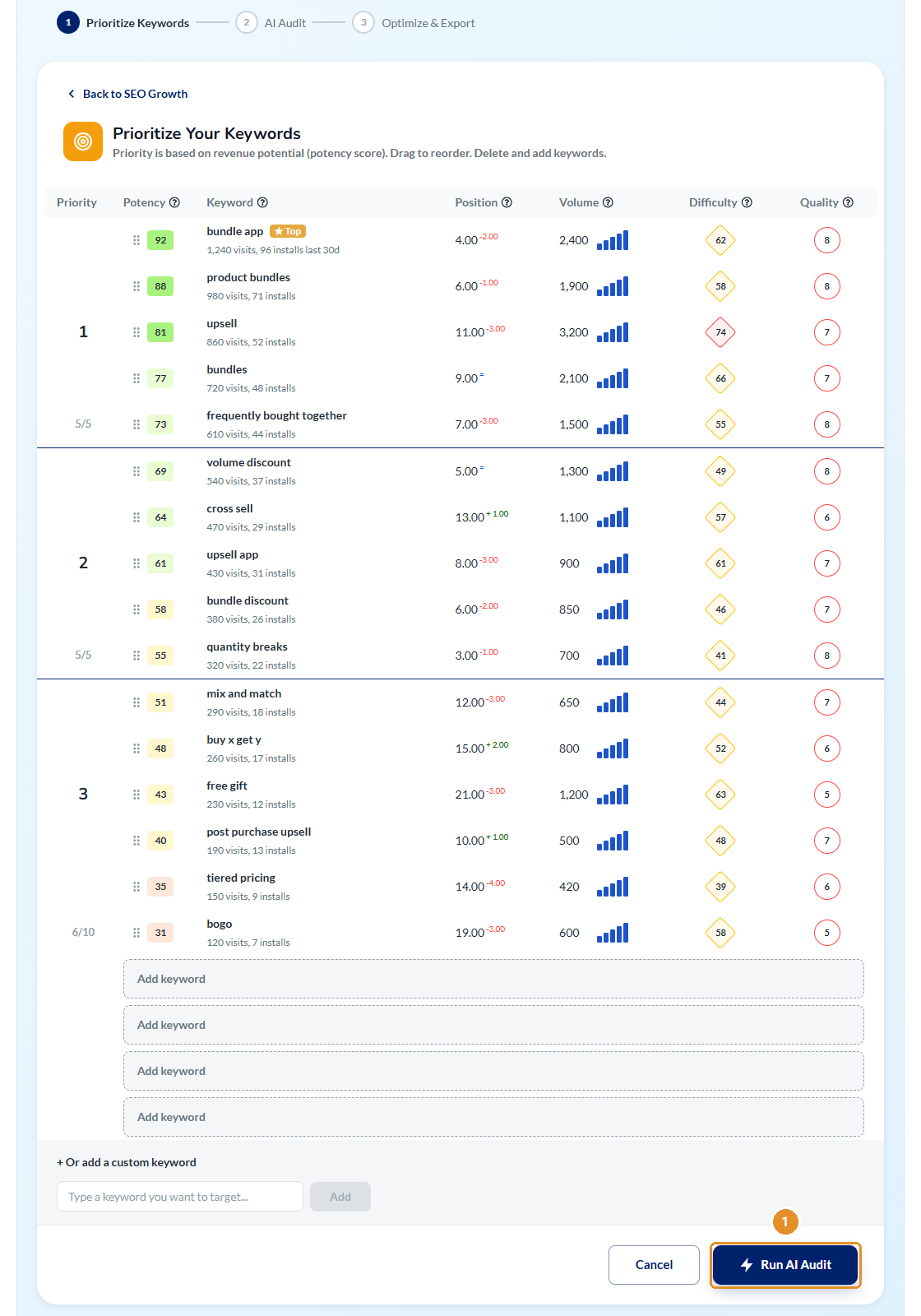
Prys lists the keywords that bring visits to your App Store page, ordered by potency: each keyword's revenue potential, from its visits, how well they convert and how hard it is to rank (How Prys counts). They're grouped in 3 priorities:
- Priority 1: your top 5 keywords. They go in the name, subtitle and intro.
- Priority 2: the next 5.
- Priority 3: up to 10 more.
Drag a keyword to move it, hover it and click remove, or type one under Or add a custom keyword.
Tips
- Remove your brand name, its typos and combinations. You already get that traffic.
- Put non-brand typos and competitor names in Priority 3.
1. When the list looks right, click Run AI Audit (1).
Step 2: Read the audit
The audit shows your Optimization Score and the Keyword Placement Matrix: where each keyword appears in your current listing (name, subtitle, intro, description, bullets) and whether its placement is Good, Pass or Poor. Click Optimize your app store page with AI.
Step 3: Optimize and export
Prys writes a new version of every field: name, subtitle, intro, description, 5 bullets, and the SEO fields (keywords to choose, SEO title tag, SEO meta description). Each field shows its character count against Shopify's limit.
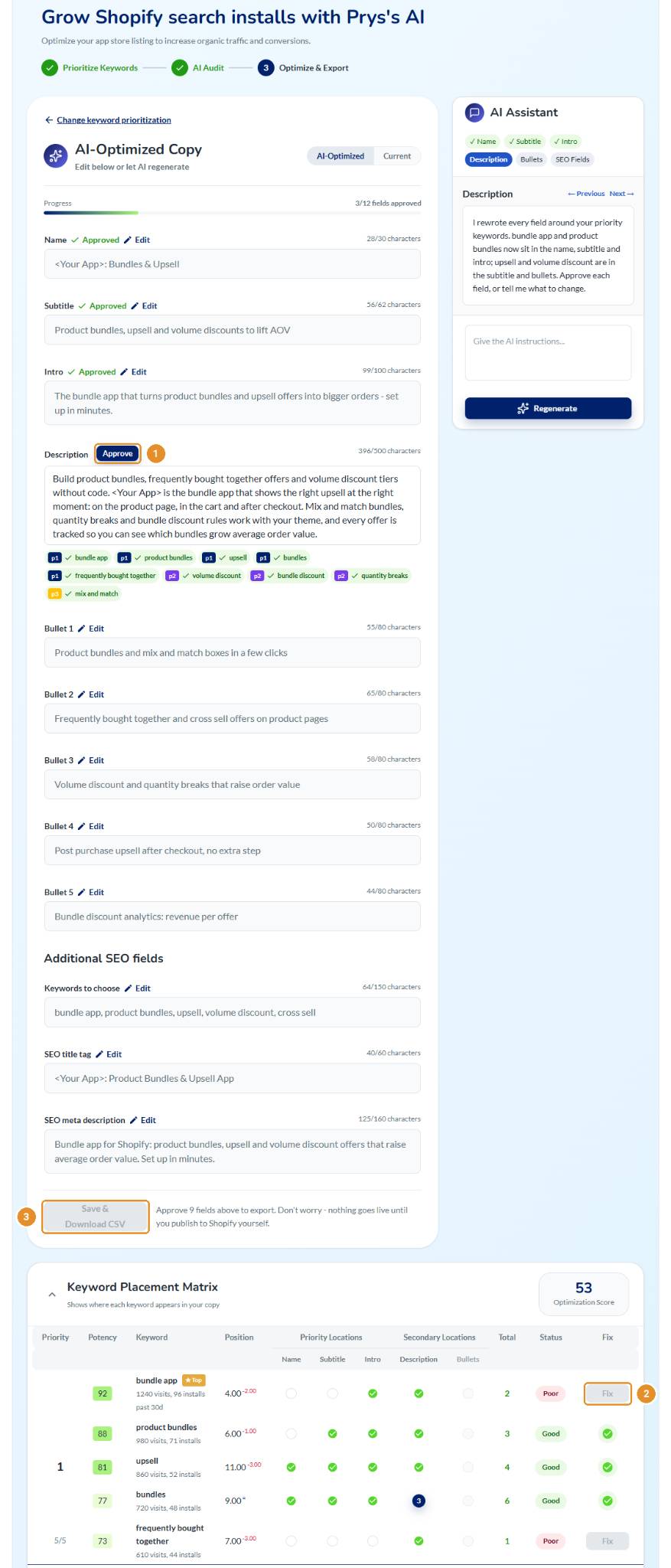
1. Read each field. Click Edit to change it yourself, or tell the AI Assistant what to change and click Regenerate. When it's right, click Approve (1).
2. For a keyword that isn't Good in the matrix, click Fix (2). The Keyword fixer suggests a change for that keyword. Click Accept or Skip, then Apply & Update Score. (The fixer opens once all fields are approved.)
3. When every field is approved, click Save & Download CSV (3). Prys saves this version and downloads it as a file.
Publish it in Shopify
4. In Shopify Partners, go to App distribution › All apps › your app › Distribution › Manage listing, and open your listing (there's one per language).
5. Paste each field from the CSV into the same field in the listing. Keep the limits.
6. Click Save. The new text is live on the App Store right away.
7. Back in Prys, click View saved versions on the SEO page, find the version you published and click Mark as published. To set the day you saved it in Shopify, click the date next to Copy published. Prys then shows your results Since your last optimization.
What to expect
- Positions change over days to weeks, not hours. Check the SEO page after a week or two.
- The position Prys shows is your average in Shopify App Store search. It can differ from what you see when you search yourself, because Shopify personalizes results.
Related posts
- How Prys counts: potency, visitor value, LTV